Demo pack and troubleshooting
Demo pack
Run /tw omnigui demo (permission typewriter.omnigui.demo) to write a complete demo into the staging: the page omnigui_demo with 48 menus and the 3 entries they use (a fact, a storage and a leaderboard).
- Make sure the prerequisites are met: PlaceholderAPI with the Player, Server and LuckPerms expansions (the demo menus use their placeholders), and BasicExtension for the fact tiers.
- Run
/tw omnigui demo. The command validates the menus first. It writes nothing if a menu has a blocking error, or if an id is already used on another page. - It publishes nothing. Publish from the editor or the Typewriter panel.
- In game, run
/tw trigger omnigui_demo_index <player>to open the index.
- It is idempotent: run it again and it rewrites only its own entries, leaves identical ones untouched and keeps the other entries of the page. Copy a demo menu before editing it, because a new run can overwrite your changes.
- An entry whose type no loaded extension declares is not written and is named in the reply; the menus are still written. If the editor is saving at that moment, the command answers "busy": run it again.
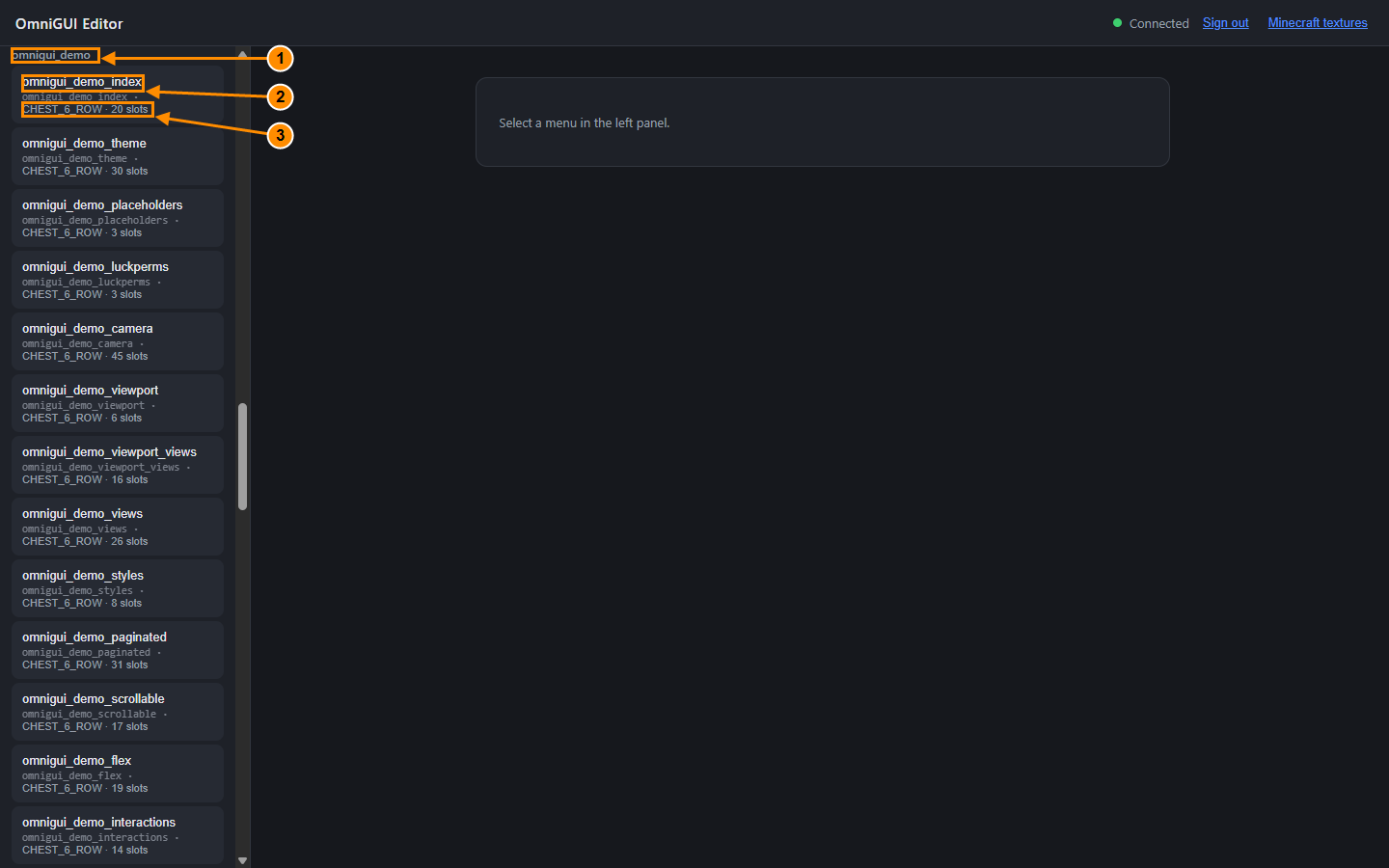
- Group: the page
omnigui_demo. - Menu name.
- Type and number of slots.
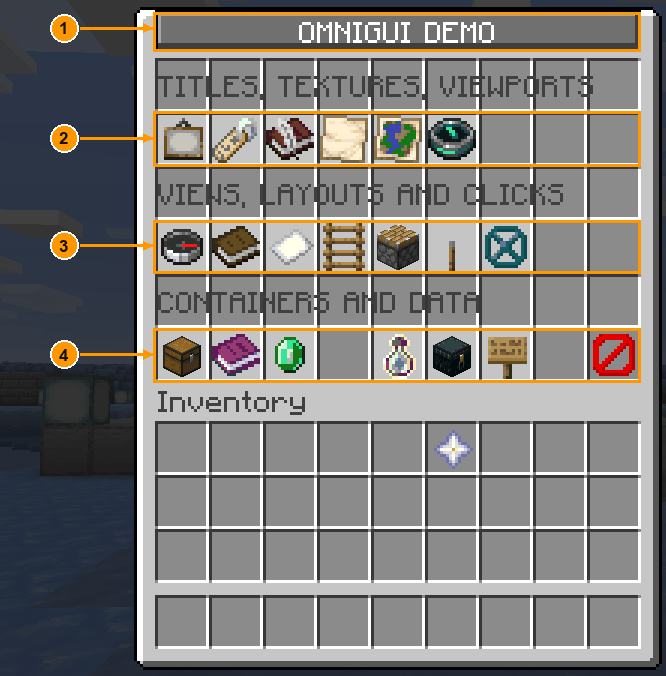
- to 4. The index buttons, each opening a family of demo menus: for instance
omnigui_demo_theme(compiled titles and nine-patch),omnigui_demo_viewportandomnigui_demo_viewport_views(scrolling windows),omnigui_demo_fact_tiers,omnigui_demo_storageandomnigui_demo_leaderboard(data).
Troubleshooting
The editor does not answer. Check that editor.enabled is true, that Typewriter was reloaded, and read the server log for a line starting with [OmniGUI]. A public-url with a path, a token under 32 characters or a busy port keeps the editor off. See gui_editor.yml.
The link opens http://127.0.0.1:... and the page never loads. The server is not on your computer, and public-url is empty: 127.0.0.1 points at your own PC. Set bind: 0.0.0.0, a port your host opens and public-url: http://<server IP>:<port>, then /tw reload. See Choose your setup.
The page never loads at the public-url address. Check, in order: the console shows Editor host listening on ... after the reload; bind is not 127.0.0.1 (unless a proxy on the same machine forwards to it); the port is one your host or firewall lets in, and not the Minecraft port; the IP in public-url is the one the panel shows for that port.
421 error, or saves refused with 403. The address in the browser is not the public-url one. Open the editor through the link from /tw omnigui editor, or add the other host name to allowed-hosts.
The link does not work. It is single use and lasts 60 seconds. Run /tw omnigui editor again.
/tw omnigui editor is refused. Run it in game, not from the console, with the permission typewriter.omnigui.editor. "The OmniGUI editor is off" means the host did not start: enabled is false, or a setting was refused and the console line [OmniGUI] at load says which.
"Signed out" after a publish. Normal: publishing reloads Typewriter, which ends the sessions. Run /tw omnigui editor for a new link.
Squares in the title. The client did not accept the resource pack or has an old one. Read the client log, and check that the pack was sent after your publish (a rebuild sends it again to every player).
The material picker is empty right after a restart. The editor retries by itself; wait a few seconds, or reload the page.
No icons or no container background. Import your client jar (see Import your client jar). Already imported once? It is kept per browser and per editor address: another browser, a cleared cache, private browsing or a new public-url needs a new import.
A button command does nothing. If it holds a placeholder or {input} whose value has a space or a special character, the command is refused and the console names the placeholder. See Placeholders.
New ItemsAdder assets do not show. Run /iazip, then reload the editor page.
Publish is greyed out. The open menu has blocking validation errors; the tooltip gives their number.
"Test in game" is refused. The session was opened with the token, which names no player. Sign in with the one-time link.